When scheduling music lessons, you can select a room/location for each lesson from the location list. To set up your location list:
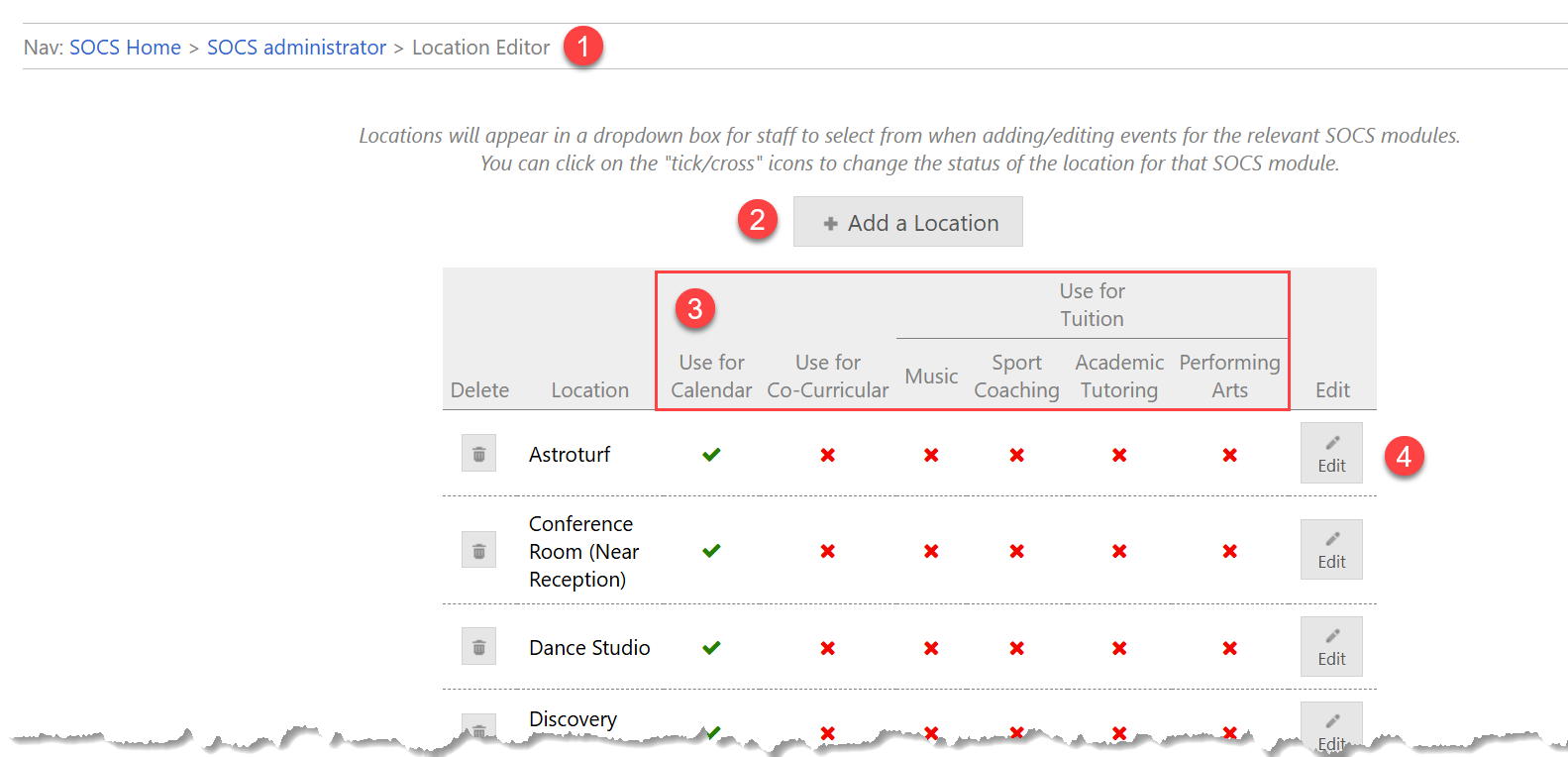
1 Navigation
SOCS Administrator > Event Locations Editor (or Calendar Locations Editor)
If using SOCS Facilities, locations can be viewed in Locations Editor but setup is controlled using:
SOCS Facilities > Settings > Rooms & Locations
2 Add a location
Select + Add a Location
3 Enable/disable a location in other modules
Select the Edit button next to the location to change an existing location
4 Edit a location
You can edit the location name and/or the modules that use the location
- Select the Edit button next to the location to change an existing location
- Enter location name
- Select which SOCS modules can use the location
- Select Save
Locations added in this way will now appear in a dropdown box when adding or editing a music lesson.
Only SOCS Main users are able to set up Rooms & Locations
Was this article helpful?
That’s Great!
Thank you for your feedback
Sorry! We couldn't be helpful
Thank you for your feedback
Feedback sent
We appreciate your effort and will try to fix the article