Only users with "Main" access can add new clubs in SOCS Co-curricular.
Step 1:
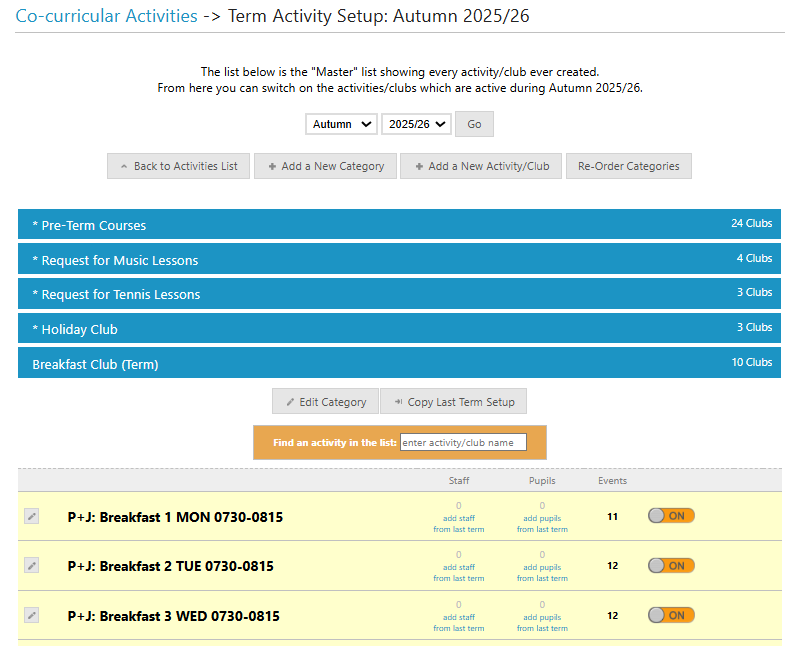
Log in to SOCS Co-curricular and navigate to Activities - Master List
Step 2:
Select Add a New Activity/Club
Step 3:
Select which category the club should be added to and type the name of the club into the Activity Name field
Step 4:
If you also use SOCS Calendar, you can pin the club to a school division (e.g. Seniors) so that when visitors to your SOCS Calendar website are filtering by "Seniors", the club will be visible
Step 5:
Once you have saved the club details, you can switch the club on/off from the Master List which is usually done on a termly basis using the on/off toggle button. Anything that you switch on in here will become available in the Active Activities area.
Was this article helpful?
That’s Great!
Thank you for your feedback
Sorry! We couldn't be helpful
Thank you for your feedback
Feedback sent
We appreciate your effort and will try to fix the article