Follow the instructions below if using Method 2 which will allow staff to assign activities to an individual pupil.
Step 1
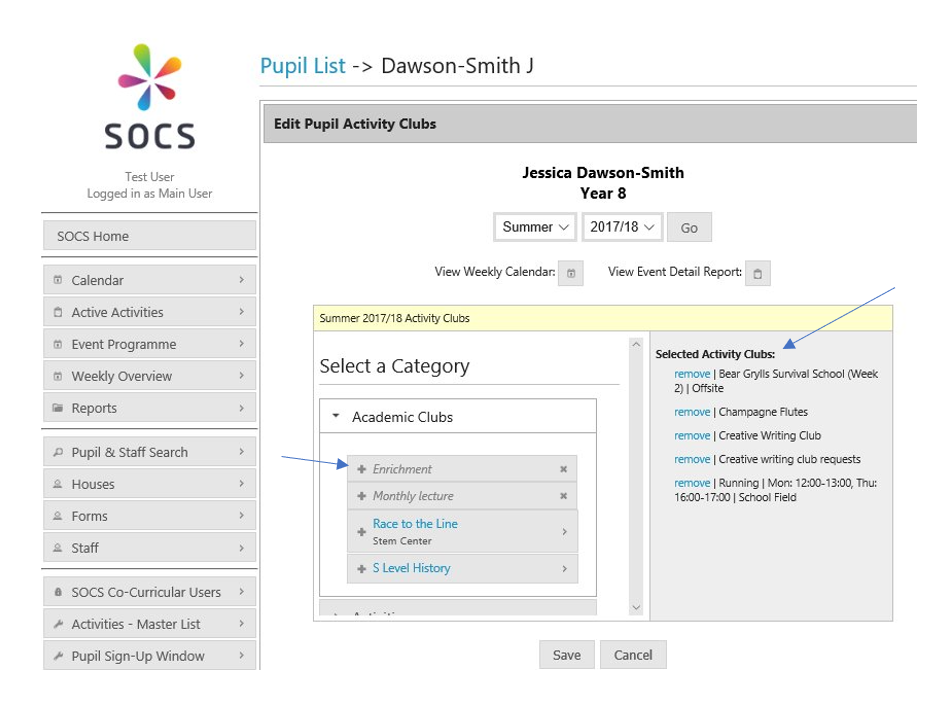
Click the Pupil & Staff Search menu item on the left and search for a pupil. Find the relevant pupil and click Activities.
Step 2
You can then edit the activities assigned to a pupil by selecting a category and adding the activity to Selected Activity Clubs.
Only activities available to that year group will appear as options.
Was this article helpful?
That’s Great!
Thank you for your feedback
Sorry! We couldn't be helpful
Thank you for your feedback
Feedback sent
We appreciate your effort and will try to fix the article