Participation reports are generated automatically from your sports, teams and fixtures which have team sheets.
To access participation reports follow these steps:
Step 1
Login to SOCS Sport
Step 2
Select Team Sheet Builder in the left-hand menu
Step 3
Select Participation Reports
There are two ways to view the participation data for your school:
Option 1: By Year Group & Pupils
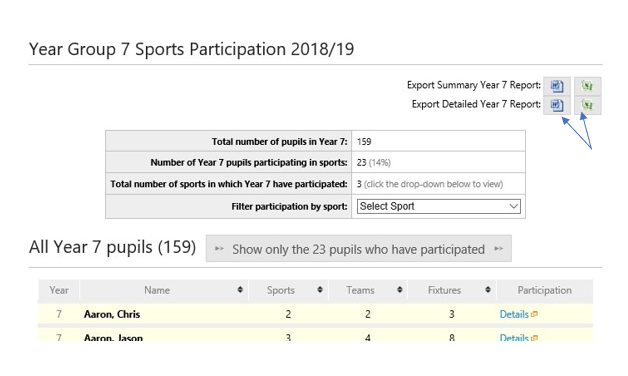
If you choose to view the data by year group and pupils, you are able to view each year group, and drill down the participation data for individual pupils.
For each pupil you will be able to see data such as the following:
- the number of sports played;
- the number of teams played for;
- the number of fixtures played in.
You can also export a more detailed report to Word or Excel by clicking the icons below:
Option 2: By Sports & Teams.
View each sport, and drill down to individual team's participation data.
For each team you will be able to see data such as the following:
- the number of pupils that have played;
- which pupils have played;
- the number of times each pupil has played.
Was this article helpful?
That’s Great!
Thank you for your feedback
Sorry! We couldn't be helpful
Thank you for your feedback
Feedback sent
We appreciate your effort and will try to fix the article